The autonomous growth engine, feature by feature

Discover customers, create content, publish across channels, run email outreach, and track your AI search visibility, all from one workspace running on autopilot.

  • GEO & SEO

    Be found in AI & search

  • Blog posts

    Create & publish content

  • Social media

    Schedule & publish

  • Customer outreach

    Find prospects. Start conversations.

An AI CMO that runs the repeatable work

An AI CMO is software that runs the repeatable parts of a marketing function. It finds opportunities, decides what to create, publishes approved work to the channels you connect, and reviews what happened. A person still sets direction, approves brand decisions and owns the outcome.

Explore the AI CMO

One workflow, five useful places to start

You can start from a search finding, an idea, a connected channel, a prospect, or a question for your agent. Each path leads back to the same workspace.

SEO and GEO from actual signals

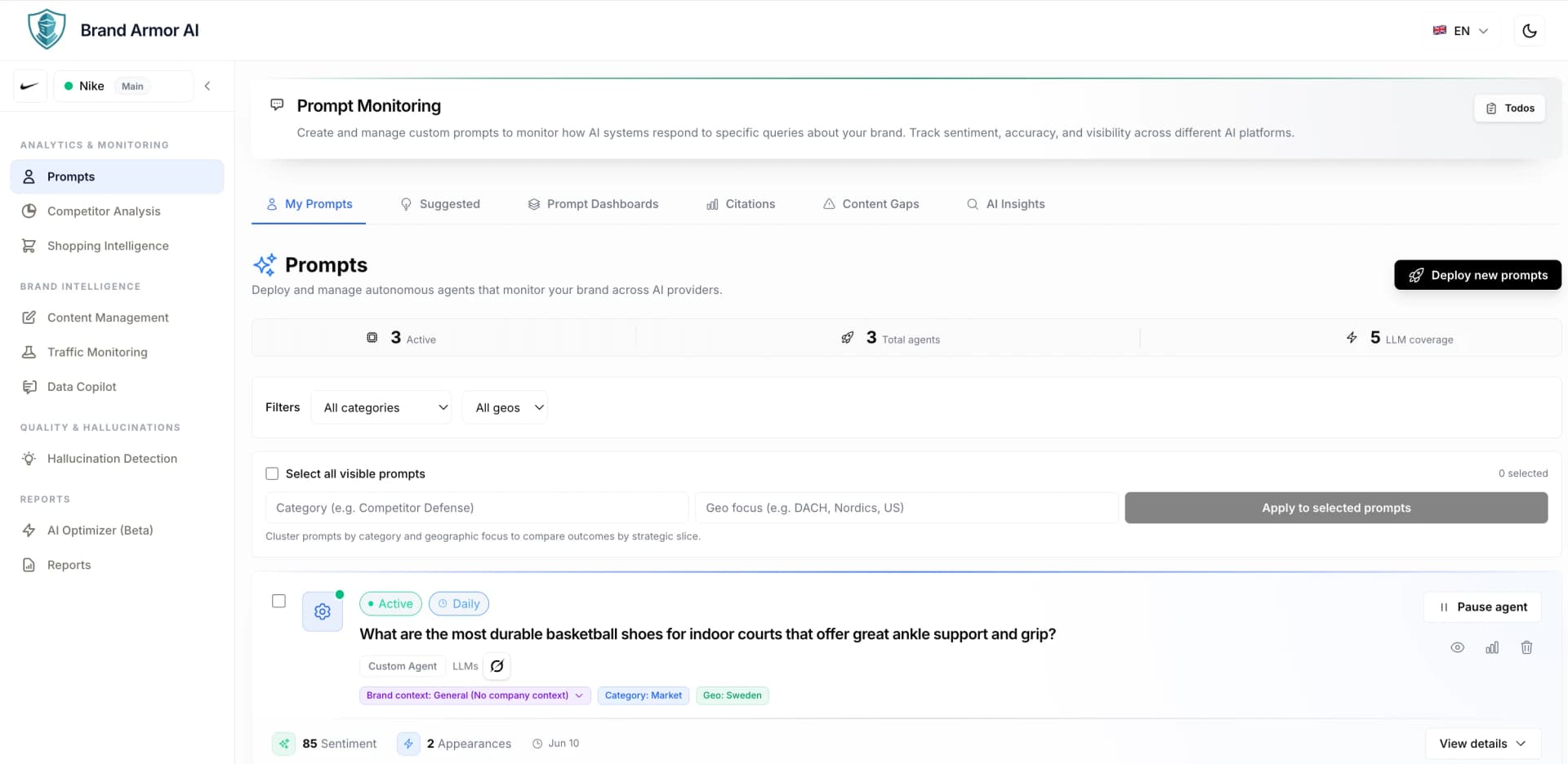
Start with a page or a question. Compare connected Search Console data, monitored AI answers and citations, and recognized crawler requests. Each finding keeps its source so you can inspect the page before changing it.

See prompt monitoring
Create with your brand in the room

Create text, images, carousels, portrait videos, and blog drafts from a brief. Brand Identity supplies approved facts and reusable assets. Preview the result, edit it, and check the displayed credit cost before generating media.

Explore the creative studio

Publish on connected channels

Review and schedule social posts for the accounts you connect. Blog drafts can be sent to supported CMS destinations. Recurring autopilot runs within the rules you configure; a draft stays a draft until you schedule it or authorize publishing.

See publishing features

Find and contact possible customers

Explore prospects that fit your criteria, then prepare personalized outreach using the available account and email connections. Review the target and message before sending; prospecting and publishing are separate workflows with their own permissions.

Explore customer outreach

Work through an agent when you want to

Ask the Overview agent to investigate or prepare work in the connected workspace. A compatible external assistant can use MCP to read supported data and request agent actions with the same account scope.

Explore MCP access

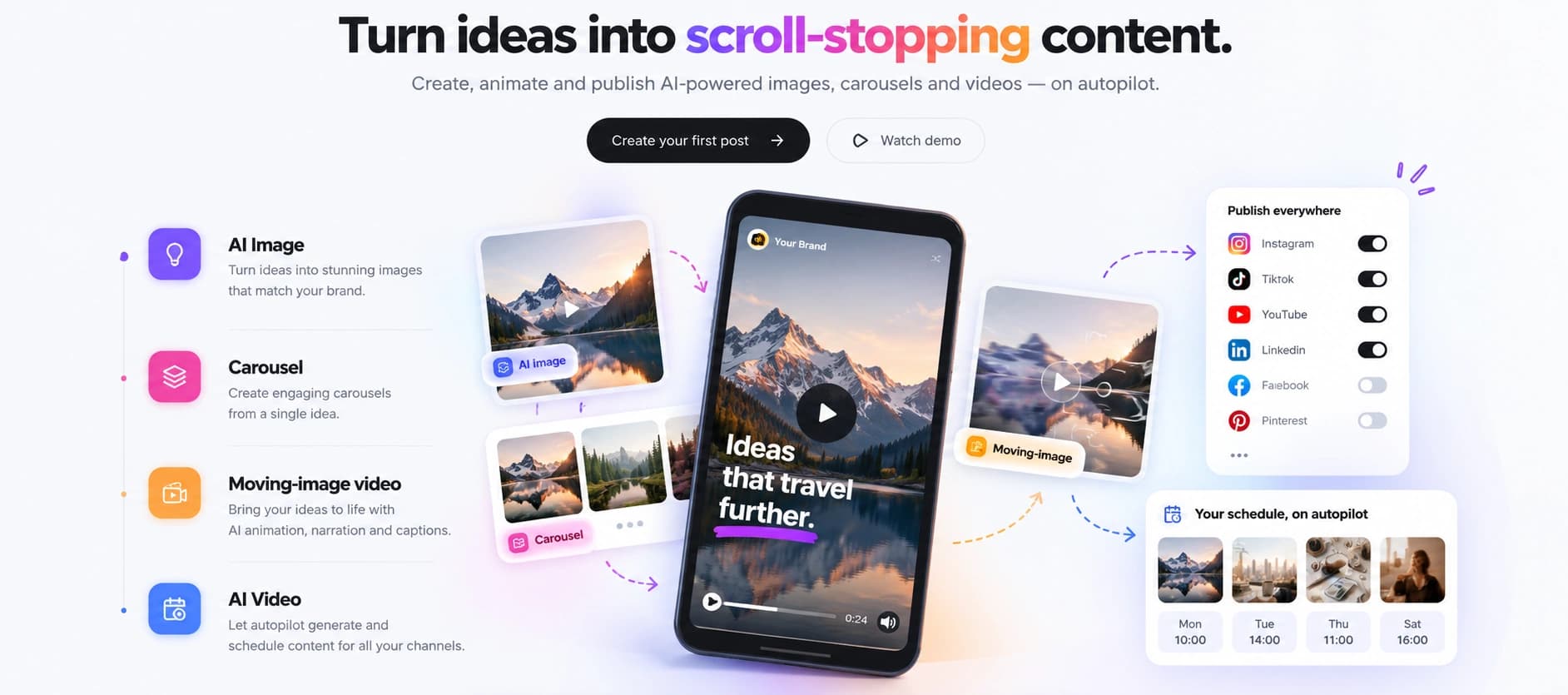
Turn ideas into scroll-stopping content.

Create, animate and publish AI-powered images, carousels and videos — on autopilot.

  • AI image

    Turn ideas into stunning images that match your brand.

  • Moving-image video

    Bring your ideas to life with AI animation, narration and captions.

  • AI video

    Let autopilot generate and schedule content for all your channels.

Publish everywhere

Instagram
TikTok
YouTube
LinkedIn
Facebook
Pinterest

Your schedule, on autopilot

Mon10:00
Tue14:00
Thu11:00
Sat16:00
Real data

Get real insightsfrom real prompts.

Track how AI responses mention your brand, cite sources, and recommend alternatives. Turn the questions your audience asks into visibility insights you can act on.

ChatGPTbest project management tool
Geminimarketing automation for startups
Claudetop tools for small business growth
Illustrative queries

Across supported AI platforms

ChatGPT

Crawler insights

Claude

Crawler insights

Gemini

Crawler insights

Perplexity

Crawler insights

Grok

Crawler insights

Google

Crawler insights

Copilot

Crawler insights

DeepSeek

Crawler insights

Mistral AI

Crawler insights

Llama

Crawler insights

Provider availability and monitoring frequency depend on your plan.

GEO & SEO

Don’t just publish. Know where you’re recommended.

Understand how ChatGPT, Claude, Gemini, and Perplexity talk about your brand. Use visibility insights to guide what you create next.

ChatGPTClaudeGeminiPerplexity
  • Track brand mentions in AI answers
  • Explore citations and source pages
  • Compare your visibility with competitors
Brand Armor AI
Product preview · example data

More than a content generator

Keep your brand, channels, and decisions together.

Brand Identity

Reuse approved facts, colors, logos, and product photos across your creations.

Talking portraits

Animate a supplied portrait with narration and lip sync, using your own image as the visual source.

Connected publishing

Review and schedule social posts and send blog drafts to a connected CMS.

Customer outreach

Find prospects that match your criteria and prepare personalized emails through your connected sending account.

Your agent, or your own AI

Ask the workspace agent to research, create, and schedule. Use a compatible MCP assistant to work with the same workspace.

How it works

From setup to customers.In three simple steps.

Set up your brand once. Bring research, content, and distribution together, with autopilot following your goals and preferences.

01

Connect your brand

Tell us about your business, connect your website and social accounts, and set your goals.

Your brand

Websiteyourbrand.com
Social media
linkedininstagramyoutubetiktok
Customer outreach
Goals

Connect once. We do the rest.

02

AI finds & creates what works

Discover opportunities across GEO and SEO. Create articles, images, videos, and outreach tailored to your brand.

GEO & SEO

Be found in AI & search

Blog posts

Create & publish content

Social media

Schedule & publish

Customer outreach

Find prospects. Start conversations.

Creating your content…
03

Publish everywhere

Schedule content for your connected channels and reach potential customers with personalized emails. You choose what runs on autopilot.

GoogleChatGPT
linkedininstagramyoutubetiktok

Publishing on autopilot

Your brand. Everywhere.

Your brand, built in
You stay in control
Your schedule, respected
One connected workflow

See when AI systems reach your website

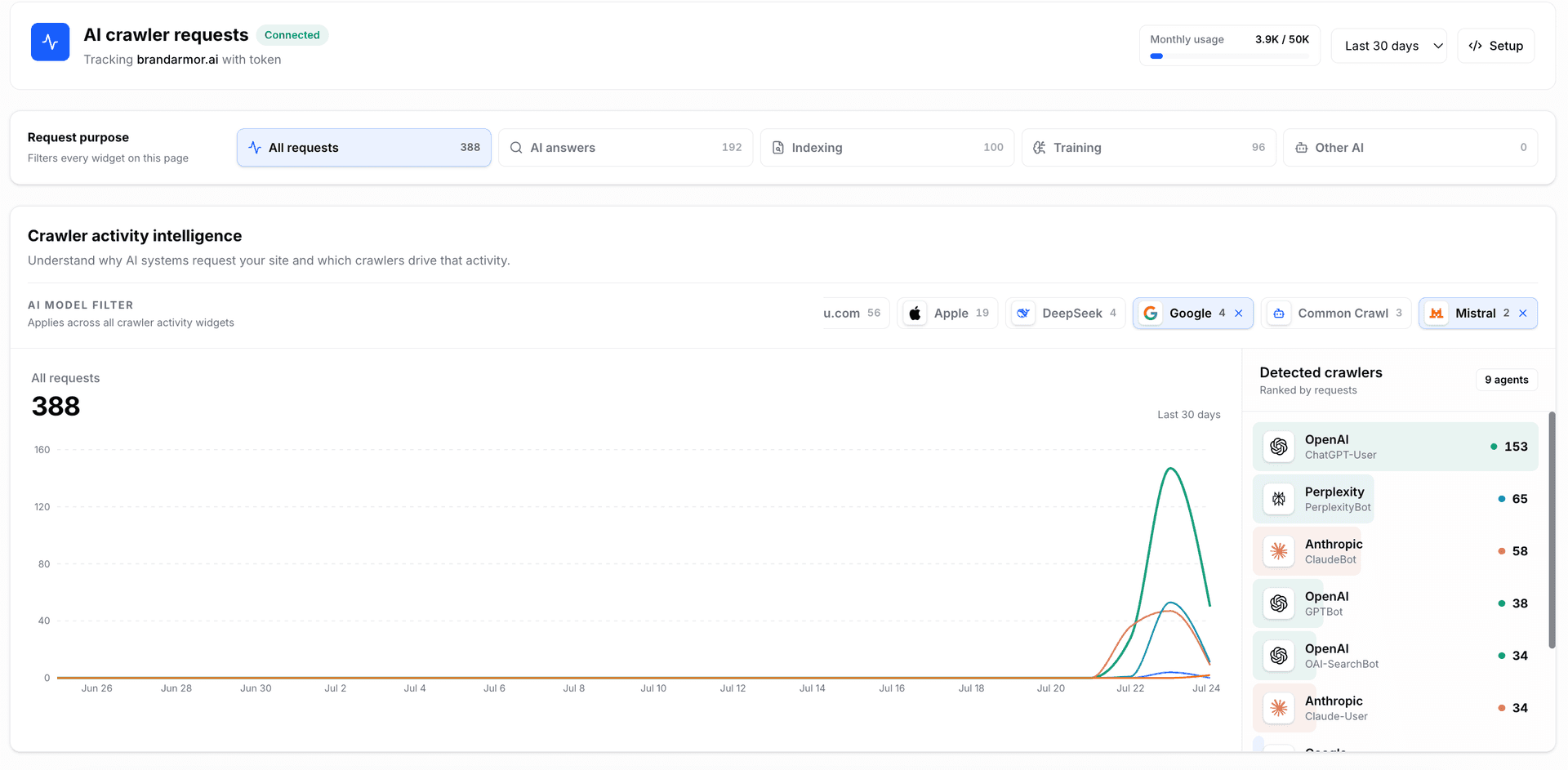
Browser analytics misses many automated requests. Brand Armor AI records eligible requests from recognized AI crawlers and user-triggered agents on the server, giving your team direct evidence of which pages they reached and when.

A crawler request confirms access. It does not by itself prove indexing, model training, citation, or recommendation, and it does not expose the AI user’s original prompt.

Live request activity

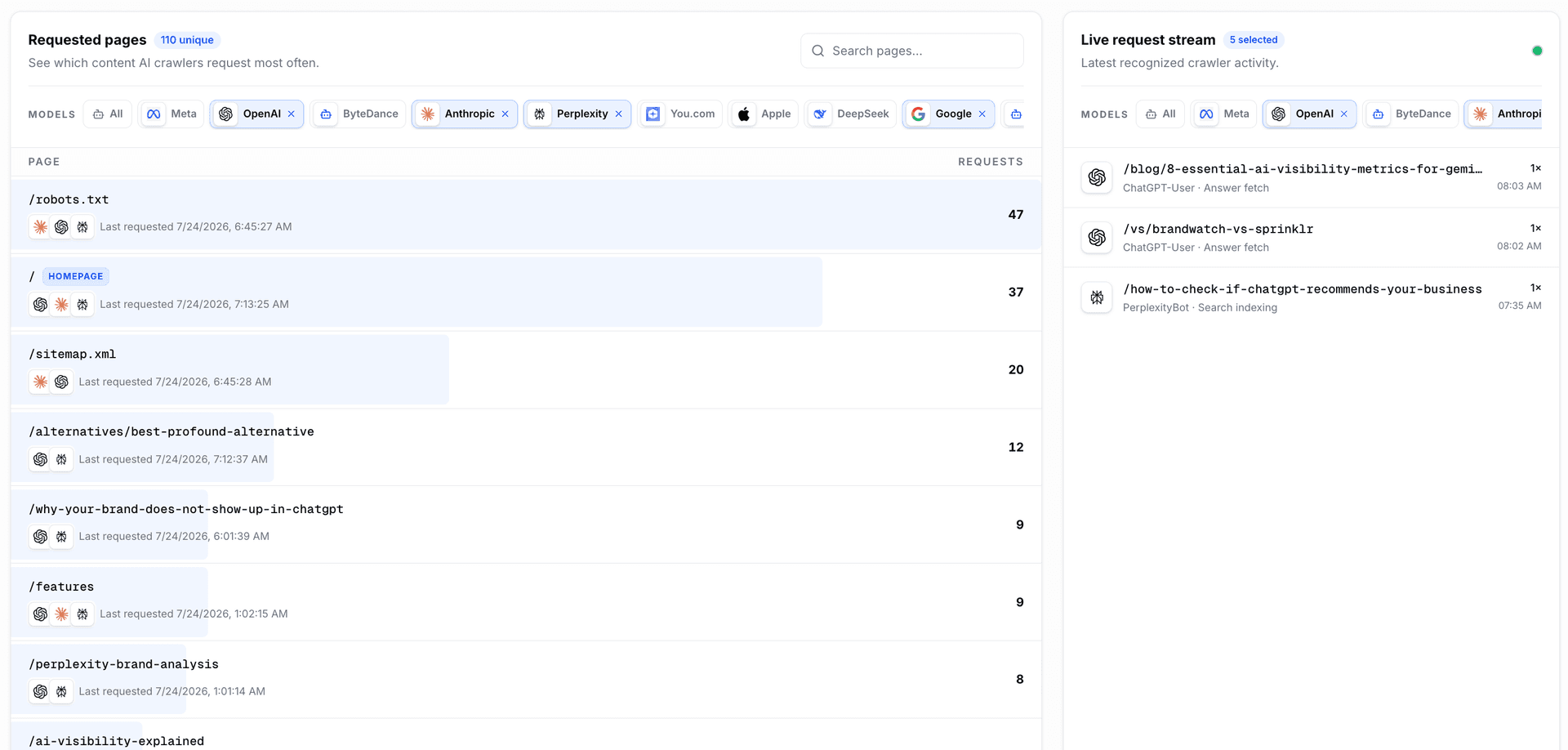
Inspect crawler, provider, URL, time, status, and available purpose.

Requested-page coverage

Find frequently requested URLs and gaps across priority pages.

Provider comparison

Filter OpenAI, Anthropic, Perplexity, Google, and other recognized ecosystems.

Crawler health

Spot failed responses and access problems before they become persistent blind spots.

Brand Armor AI Live AI Crawler Monitoring dashboard with request-purpose filters, activity trends, and detected crawlers
Crawler activity by provider and purpose
Brand Armor AI requested pages report and live AI crawler request stream
Requested pages and live request stream

How creation, publishing, and the agent work together

Practical answers about connected data, creative formats, and recurring work.

What can the workspace agent do?

Agent

The agent can use the brand and connected workspace context to answer questions, prepare creative work, inspect SEO and GEO opportunities, and request supported actions. Publishing or credit spending requires an explicit request or configured autopilot rules.

How do SEO and GEO evidence work together?

SEO and GEO

Connected Search Console data can point to pages with search opportunities. Monitored AI prompts show observed recommendations and citations. Crawler requests show access to specific URLs. Each signal answers a different question; none alone guarantees a ranking or recommendation.

Does Brand Armor AI automatically publish everything it creates?

Publishing

No. You can create and review drafts, schedule individual posts, or configure autopilot for recurring work. Publishing requires a connected destination and the permissions that destination needs.

Which content can I create?

Content

Create text posts, single images, carousels, portrait videos, and blog drafts. Approved Brand Identity facts and assets can guide output, and media or video generation may use a separate credit balance.

What does the crawler dashboard prove?

Evidence

It records eligible requests from recognized crawlers and agents, including pages and available request details. A crawler request proves access to a URL; it does not prove indexing, citation, recommendation, or the original question a person asked.

Can I use my own AI assistant?

MCP

A compatible assistant can connect through MCP with workspace authorization to read supported data and request agent actions. The connection uses the same account scope and does not bypass approvals or publishing rules.

Looking for basic questions? Check our complete FAQ.

View Complete FAQ

Turn one company brief into ongoing growth work

Launch your workspace, connect the channels that matter, and let Brand Armor AI discover opportunities, create content, publish it, and learn from the results.

Fast workspace setupClear team workflowsScales with your operation

Recommended Path

1

Tell us about your business, connect your website and social accounts, and set your goals.

2

Discover opportunities across GEO and SEO. Create articles, images, videos, and outreach tailored to your brand.

3

Schedule content for your connected channels and reach potential customers with personalized emails. You choose what runs on autopilot.

Explore with AI

Understand Brand Armor AI features in depth